 Live Chat
 Log In

Linken Sphere Review: How the Legendary Anti-Detect Browser Works and What It Can Do
The use of high-quality proxies in conjunction with a reliable anti-detect is the foundation for successful earning online. Such a tandem allows scaling the work: now each account on any platform looks like a separate user with a unique device and its own IP. This is the best way to bypass the algorithms of anti-bot systems of popular platforms.
While Squid Proxies is responsible for a stable connection and clean IP addresses, the Linken Sphere browser is responsible for the convenience of profile management. A huge plus is that the browser natively works with proxies, and you can start working with it completely for free.
Linken Sphere: A Reliable Tool for Multi-Accounting
Linken Sphere is one of the "pioneers" of the industry, which appeared back in 2017.
Over the years of work, the product has seriously evolved: having preserved its reliability, it has acquired a modern interface and has become maximally accessible even for beginners — you can create a profile with optimal settings in one click.
Today, the browser effectively helps in a wide variety of niches: traffic arbitrage, crypto activities, e-commerce, SMM, bonus hunting, and working with multi-accounts on any marketplaces.
The main task of the software is the creation of completely isolated work sessions. Each such session has a unique digital fingerprint and its own IP, which allows managing hundreds of profiles from a single window without the risk of blockings.
Key Advantages of Linken Sphere
-
Flexible profile creation: you can configure each parameter manually or generate sessions instantly in one click with automatic settings.
-
Perfect fingerprints: the created profiles successfully pass data spoofing tests of any complexity.
-
Scalability: mass editing functions, import, and convenient management of a large amount of data.
-
Built-in proxy manager: automatic GEO detection, connection quality check, and a convenient naming system.
-
Mobile configurations: high-quality browser emulation of Android and iOS devices.
-
Accessibility: 5 free profiles without time and functional restrictions, as well as a flexible tariff grid.
-
Open API availability: useful for those who use external automation.
-
Personalization: modern design with a choice of visual themes.
Register and try the browser in action, then pair it with Squid Proxies for stable proxy connections and cleaner profile separation.
First Steps: How to Configure Linken Sphere
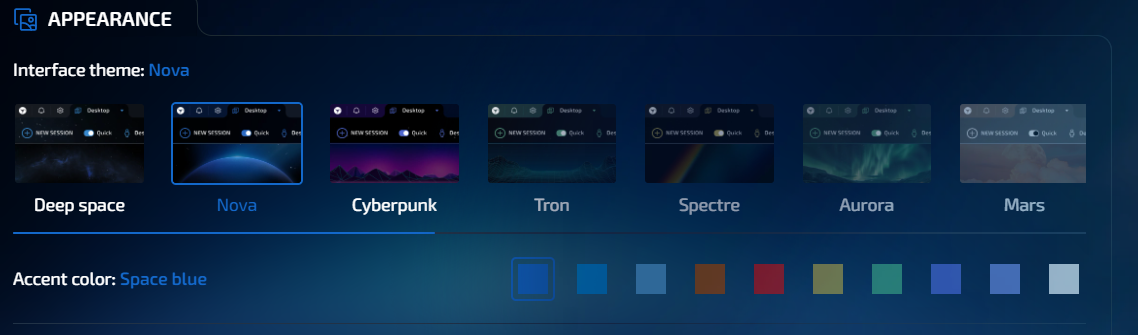
The process is standard: download the client from the official website, install, and register an account. On the first launch, the program will prompt you to set the language and choose a visual theme.
More than 15 themes are available to choose from with a choice of accent color. You can change the browser design at any time in the settings.
For a quick start, an interactive guide with animations is provided, explaining the basics of work. This onboarding is enough for 99% of users to immediately get down to business, although there are also deeper video tutorials on the site.
The interface is intuitive, and tooltips appear when hovering over buttons.
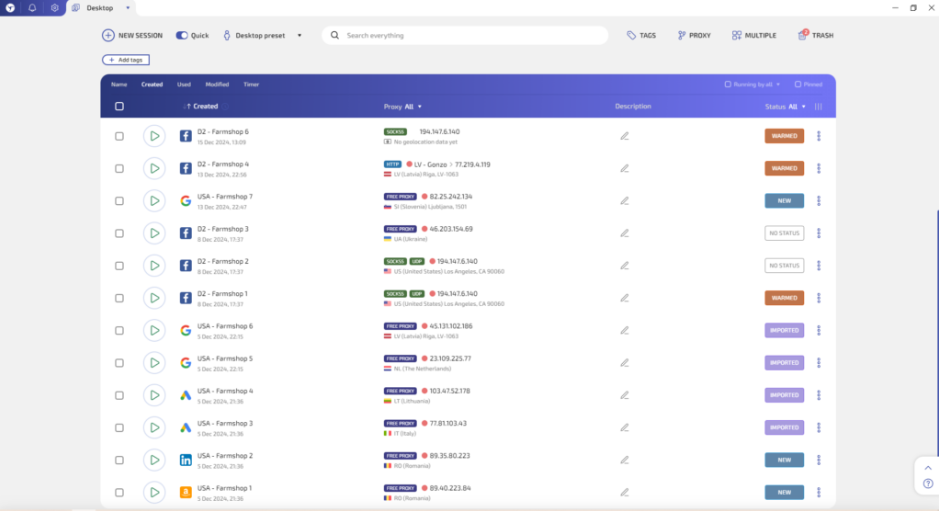
It is important to know: the work is organized on the principle of "desktops." For convenience, tags, statuses, descriptions, and icons, such as Google or Facebook logos, are provided. These help users avoid confusion when managing dozens of profiles.
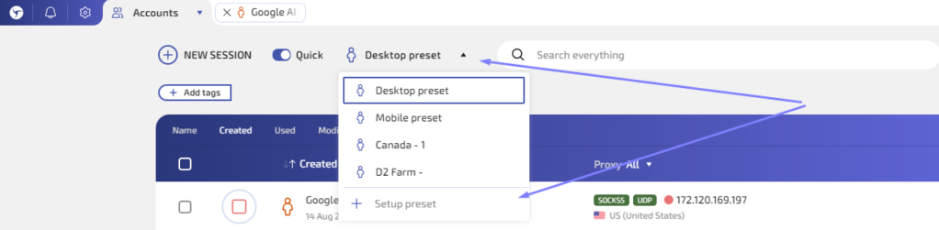
For those who value time, there are presets — ready-made settings templates. Having created such a template once, you will be able to generate new profiles with the desired parameters literally in a second.
Creating a Work Session
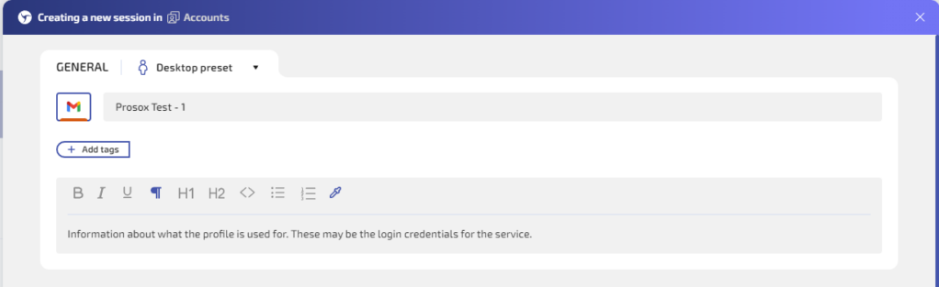
To launch a new profile, click "New session."
-
Add a profile name, description, and tags.
These parameters are used exclusively for convenient profile management. You can set the system most comfortable for you or use the default name without additional information.
-
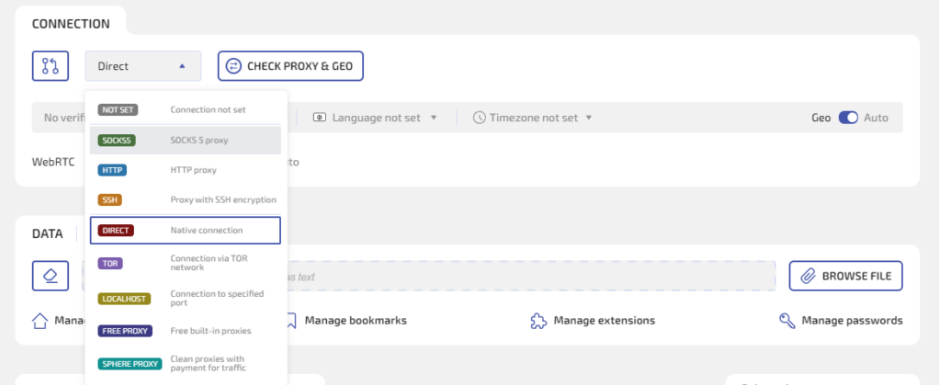
Configure the connection.
Choose the proxy type and add the connection data. HTTP, SOCKS5, SSH, Tor, and Localhost are supported.
-
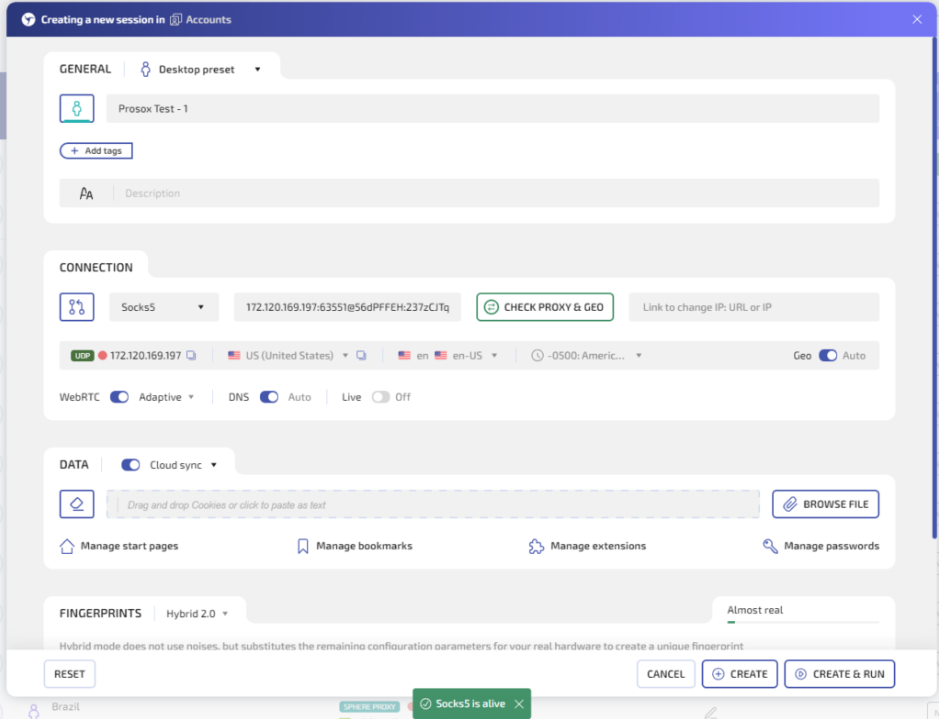
Set up the IP.
Copy the Squid Proxies connection data and simply paste it into the field. The format is recognized automatically. -
Verify the proxy.
Click "Check proxy & GEO" to make sure the address is working.
-
Import cookies if needed.
If you use browser profiles with cookies, import them in the "Data" section. -
Choose the browser fingerprint settings.
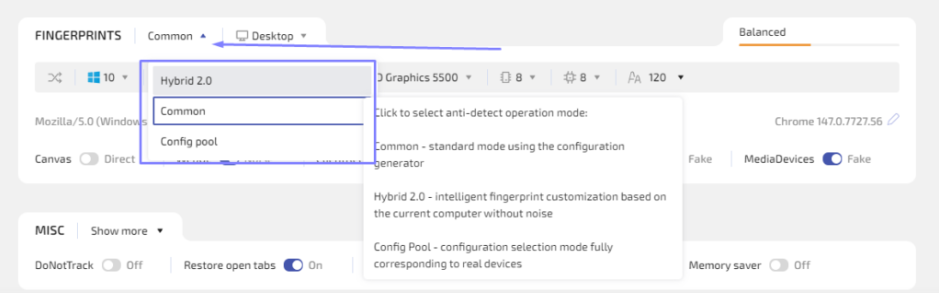
You can either manually specify the necessary device parameters or create profiles in automatic mode, generating a profile with optimal settings.
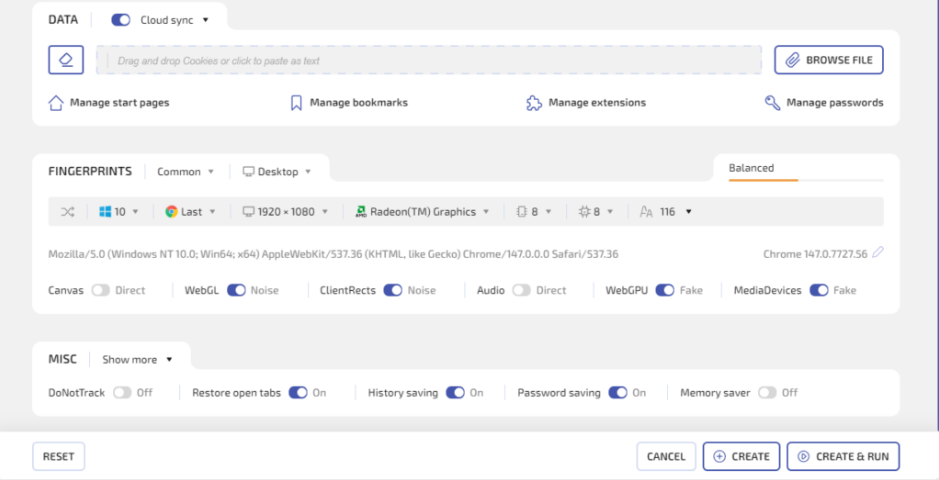
If you do not understand how to work with digital fingerprints, then simply use the automatic parameters offered by the browser, or choose the Hybrid 2.0 mode. This is a smart mode that itself adjusts the parameters to your "hardware," making the fingerprint as natural as possible.
Also, the browser has a collected database of configurations of real devices.
An indicator on the right side of the window will help beginners: it shows how well the profile settings match a real device. If everything is fine, then save and launch the session.
Convenient Proxy Management
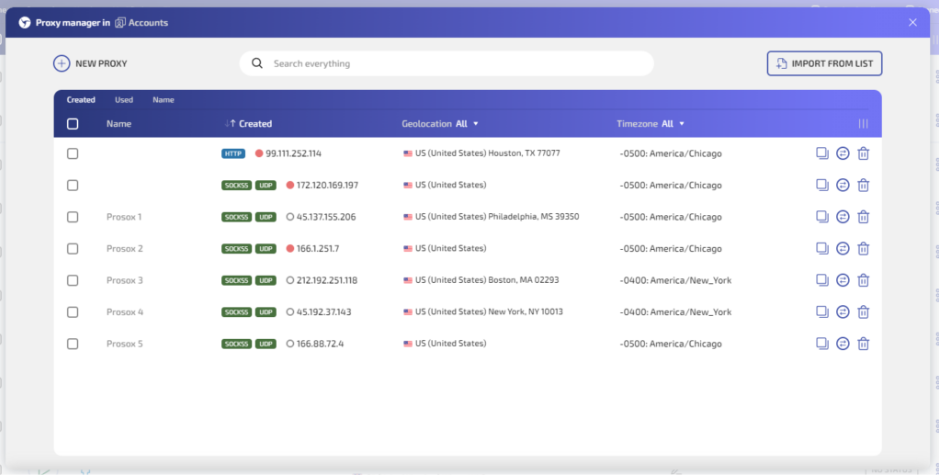
Linken Sphere has a full-fledged proxy manager. You can add IPs one by one or load them en masse in whole lists via the "Import from list" menu.
During import, you can set a general naming logic to later quickly find the desired address in the list.
How Much Does Linken Sphere Cost?
If we analyze the market of leading anti-detect browsers, Linken Sphere offers flexible conditions both for beginners with a small number of profiles and large teams.
In addition to the free plan for 5 profiles, the service offers the Pure plan, which provides 30 profiles for $30/month and basic functionality.
The next plan is Light, which includes 150 profiles for $90/month, a mobile browser emulator, and 100 free proxies.
The Pro plan includes 500 profiles for $160/month and the work of 10 team members inside, as well as API support.
The Premium plan is the optimal solution for teams, which includes 1000 profiles, an unlimited number of team members, and an expanded volume of free proxies.
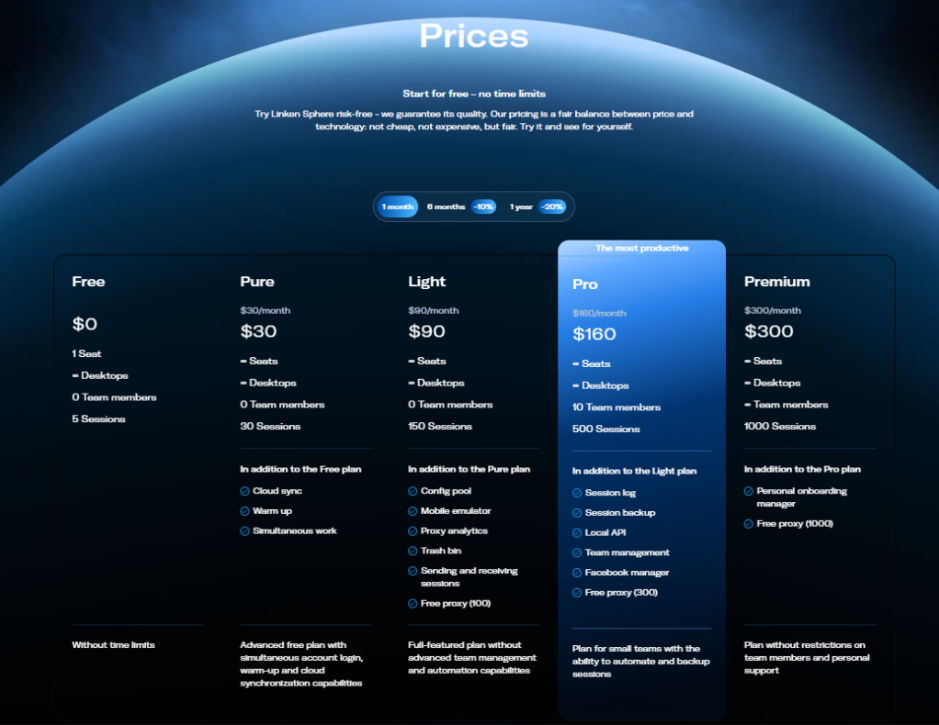
For large teams, significant savings on members are achieved, since in Linken Sphere there is no need to additionally pay for seats, unlike most competitors.
Is It Worth Using Linken Sphere with Squid Proxies?
If your activity requires working with multiple accounts, it is impossible to do without a professional anti-detect. Linken Sphere stands out from competitors with the speed of updates, high quality of fingerprint spoofing, pleasant design, and reputation proven over the years.
Proxies from Squid Proxies can be used with Linken Sphere in a couple of clicks. Considering the availability of a free plan and the ability to pair each browser profile with a stable Squid Proxies connection, this is one of the most rational ways to start serious work in multi-accounting with minimal risks.
Related Articles
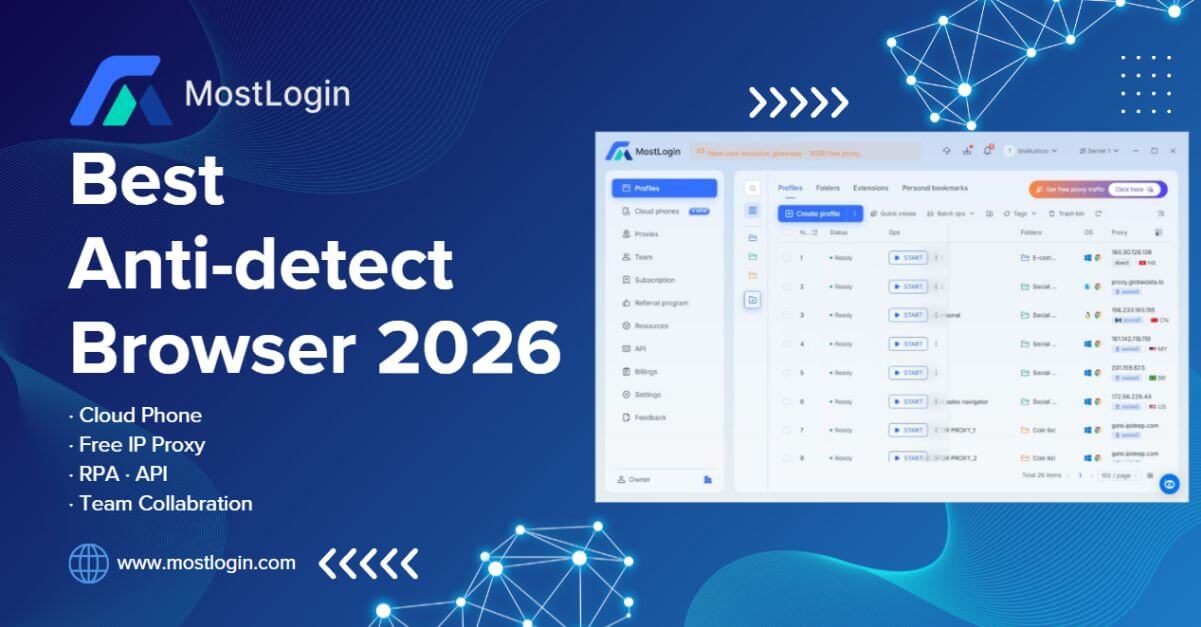
MostLogin: The Premier Anti-Detect Browser for Seamless Multi-Account Management and Automation
MostLogin is an anti-detect browser designed for secure multi-account management, browser profile isolation, proxy integration, automation, and team collaboration. It supports use cases across e-commerce, social media, affiliate marketing, advertising, and other multi-profile workflows.

E-Commerce Price Monitoring Infrastructure Guide
A practical, metrics-driven guide to designing, operating, and scaling e-commerce price monitoring infrastructure for marketing, SEO, and data teams.
Local SEO Monitoring with Residential Proxies: Accurate Geo-Results at Scale
A practical guide to running location-accurate SERP and map monitoring using residential proxies. Learn about architecture, routing choices, metrics, failure modes, and a decision framework built for agencies, brands, and data teams.